
In this tutorial I have explain about the fetch Facebook user details using AngularJS
<html ng-app id="customersApp">

  <head>

    <title>How to get facebook user details using AngularJS Tutorials</title>

    <script src="https://ajax.googleapis.com/ajax/libs/angularjs/1.2.6/angular.min.js"></script>

    <script src="http://code.jquery.com/jquery-1.7.2.min.js"></script>

    <script>

      var app = angular.module('customersApp',[]);

      function facebookController($scope, $http) {

          //DwayneJohnson - facebook UserId

          $http.get('https://graph.facebook.com/?id=DwayneJohnson')
            .success(function (data) {
              $scope.customers = data;
          });

      }

    </script>

    <style>

      table {

        margin-left: 300px;

        color: #333;

        font-family: Helvetica, Arial, sans-serif;

        width: 640px;

        border-collapse:

        collapse; border-spacing: 0;

      }

      td{ border: 1px solid #CCC; height: 30px; }

      td {

        background: #FAFAFA;

        text-align: left;

        padding-left: 3px;

      }

      .user-image {

        width: 350px;

        height: 150px;

      }

    </style>

  </head>

  <body>

    <h1>How to get facebook user details using AngularJS Tutorials</h1>

    <div ng-controller="facebookController">

      <br/>

      <table>

          <tr>

              <td>ID</td>

              <td> {{ customers.id }} </td>

          </tr>

          <tr>

              <td>About</td>

              <td> {{ customers.about }} </td>

          </tr>

          <tr>

              <td>Category</td>

              <td> {{ customers.category }} </td>

          </tr>

          <tr>

              <td>Link</td>

              <td> {{ customers.link }} </td>

          </tr>

          <tr>

              <td>Likes</td>

              <td> {{ customers.likes }} </td>

          </tr>

          <tr>

              <td>Name</td>

              <td> {{ customers.name }} </td>

          </tr>

          <tr>

              <td>Username</td>

              <td> {{ customers.username }} </td>

          </tr>

          <tr>

              <td>Image</td>

              <td>

                <img src= "{{ customers.cover.source }}" class="user-image"/>

              </td>

          </tr>

      </table>

    </div>

 </body>

</html>
Output :
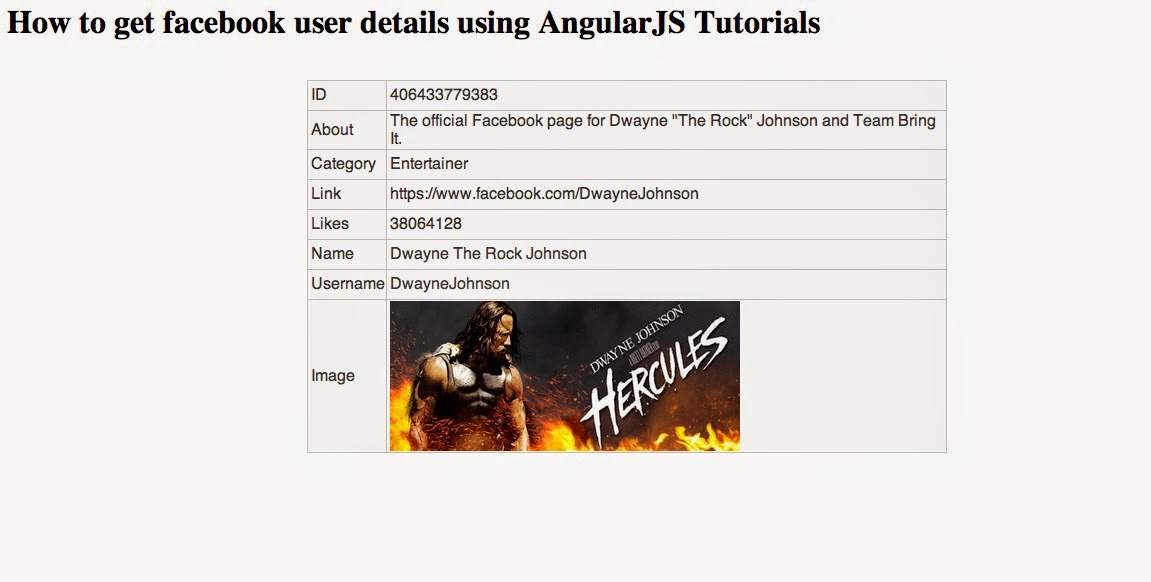
Comments
Post a Comment